★★★★☆4.9(151 reviews)
Mastering the Crack Text Effect 3D Style in Illustrator
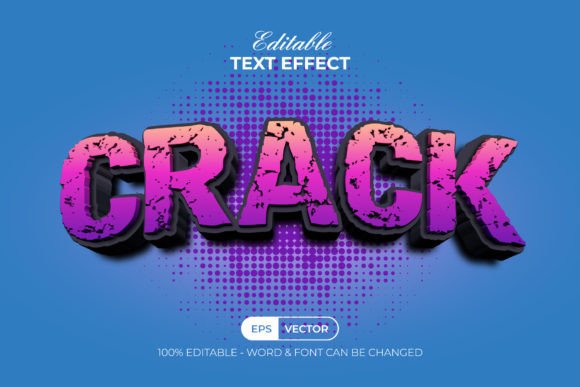
There is a specific moment in the design process where flat typography just isn't enough. You need weight, texture, and a sense of history or impact that a standard vector stroke cannot provide. This is where the Crack Text Effect 3D Style becomes an invaluable asset for creative professionals. Unlike a traditional typeface that you install into your system folder, this tool operates as a set of graphic styles within Adobe Illustrator. It allows you to take any existing text or shape and instantly apply a complex, fractured, three-dimensional appearance. The visual personality here is rugged and intense; it suggests durability, force, and a raw, industrial aesthetic that captures attention immediately. When you apply this effect, you aren't just adding a drop shadow or a bevel. You are introducing a surface that looks weathered, broken, or deeply carved. The cracks create natural highlights and shadows that give the illusion of depth without requiring you to manually draw hundreds of vector paths. For designers working on logo design projects for gaming clans, heavy metal bands, or construction firms, this style offers a shortcut to a high-fidelity look. It transforms simple sans serif or slab serif letters into objects that feel like they have been chiseled out of stone or cracked under pressure. The appeal lies in its ability to convey strength and resilience, making it a powerful choice for brands that want to project toughness.Strategic Applications Across Branding and Media
The versatility of the Crack Text Effect 3D Style extends far beyond novelty uses. In the realm of brand identity, consistency is key, but so is distinctiveness. Using a pre-built graphic style ensures that every time you apply this texture to a headline or a logo mark, the lighting angles, crack density, and color gradients remain identical. This level of uniformity is crucial when scaling a brand across different mediums. Imagine a marketing campaign where the same cracked typography appears on a billboard, a social media graphic, and product packaging. Without a standardized style, achieving that exact look manually on each file would be tedious and prone to human error. For editorial design and magazine covers, this effect serves as a compelling display element. Editors often need headlines that scream urgency or drama. A headline treated with this 3D crack effect can dominate a layout, creating a strong visual hierarchy that guides the reader's eye immediately to the main story. It works particularly well when paired with clean, minimal body copy. The contrast between the chaotic, textured display text and a simple sans serif font for the article content creates a balanced yet dynamic composition. This technique is also highly effective in packaging design for limited edition products. Whether it is a energy drink can or a special edition sneaker box, the tactile illusion of the crack effect adds a premium, collectible feel to the physical object. In digital spaces, such as web design and social media graphics, static images often struggle to compete with video content. However, a bold, textured typographic treatment can stop the scroll just as effectively. When used in YouTube thumbnails or Instagram posts, the Crack Text Effect 3D Style adds a layer of professionalism that separates amateur edits from polished creative work. It implies that effort was put into the visual presentation, which subconsciously boosts the perceived value of the content creator or the business behind the post.Workflow Efficiency and Technical Advantages
One of the most significant advantages of using this item as a graphic style rather than a font is the flexibility it offers regarding modern typography workflows. Since it is not a font, you are not limited to a specific character set or glyph arrangement. You can type your message in any commercial font you already own or even use custom-drawn shapes and logos. Once your text is converted to outlines or kept as live text, you simply click the style in the Graphic Styles menu, and the transformation happens instantly. This non-destructive workflow means you can edit the spelling, change the underlying typeface, or adjust the kerning at any point without losing the effect. For those concerned about licensing and assets, the package typically includes a Read Me file with links to free fonts used in the preview. This transparency is vital for commercial projects. It ensures that you are not inadvertently using unlicensed software in your final deliverables. It also serves as a great starting point for font pairing. By seeing which free fonts the creator paired with the effect to achieve the demo look, you get immediate inspiration for your own projects. You might decide to stick with the suggested typeface or swap it out for a bold serif font to create a more classical yet damaged look.Achieving Professional Results with Minimal Effort
Creating a realistic 3D cracked texture from scratch in Illustrator is a time-consuming task that involves complex mesh tools, blending modes, and meticulous pathfinder operations. Even for experienced vector artists, it can take hours to get the lighting right. The Crack Text Effect 3D Style condenses hours of work into seconds. This efficiency allows designers to focus more on the conceptual side of their projects—such as layout, color theory, and messaging—rather than getting bogged down in technical execution. It democratizes high-end texturing, making it accessible to hobbyists and small business owners who may not have advanced illustration skills but still require top-tier visuals. Ultimately, integrating this effect into your library of design assets expands your creative vocabulary. It provides a reliable solution for those moments when a project demands a gritty, impactful aesthetic. Whether you are building a brand identity for a startup, designing a poster for an event, or creating content for a personal blog, the ability to instantly apply a professional-grade 3D texture is a game-changer. It bridges the gap between concept and completion, allowing you to deliver polished, engaging visuals that resonate with your audience. By understanding how to leverage this tool effectively, you ensure that your typography does more than just communicate words—it communicates feeling, atmosphere, and intent.
⬇️ Download Free
Free download · No sign-up required
🔗 You Might Also Like
Layer Styles
Text effect PSD 100% easily editable, text effect with smart objects. You can re...
Graphic Templates
Adobe Illustrator 3D text effects EPS file light 3d text effect with light effec...
Tumbler Wraps
These are DIGITAL DESIGNS to be DOWNLOADED, this is not a physical item and noth...
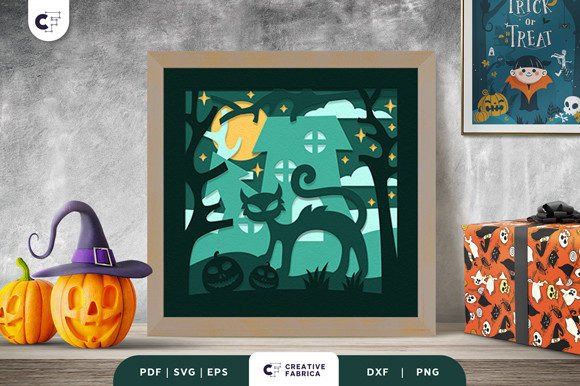
Halloween
Spooky Black Cat 3D Shadow Box SVG is a masterpiece that brings the essence of H...
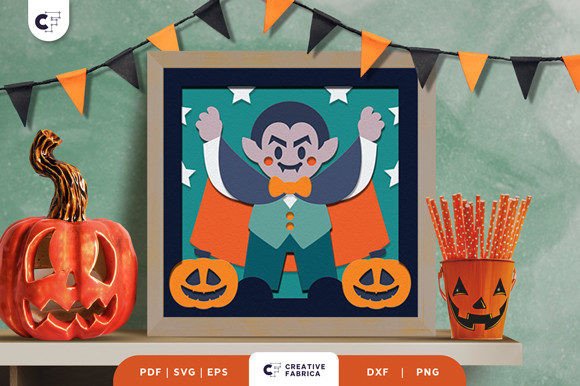
Halloween
Vampire 3D Layered Paper Cut SVG is a beautiful masterpiece that brings together...
