Mastering Your Sublimation Workflow with the 3D Camellia Leaf Tumbler Wrap
In the competitive landscape of custom merchandise and personalized goods, the difference between a hobbyist operation and a scalable business often lies in the efficiency of your design workflow. For creators, small business owners, and entrepreneurs looking to expand their product lines without reinventing the wheel, high-quality digital assets are essential. The 3D Camellia Leaf Tumbler Wrap represents more than just a pretty image; it is a strategic component in a streamlined production process. By integrating pre-designed, high-resolution elements like this into your routine, you shift your focus from tedious creation to efficient execution and quality control.
This article explores how to effectively incorporate the 3D Camellia Leaf Tumbler Wrap PNG file into your sublimation projects. We will examine the technical specifications, preparation steps, compatibility with various tools, and the broader implications for your business workflow. Whether you are a freelancer managing multiple client orders or a marketer developing a new seasonal collection, understanding the lifecycle of this digital asset is key to maximizing your output.
Understanding the Asset: Specifications and Value
Before diving into the application, it is crucial to understand exactly what you are working with. The 3D Camellia Leaf Tumbler Wrap is provided as an instant digital download, typically contained within a single ZIP file. Inside, you will find 37 individual PNG files. These are not low-resolution web graphics; they are produced at 300 DPI (dots per inch), which is the industry standard for high-quality printing. The dimensions are approximately 9.06 inches by 8.11 inches, specifically tailored to fit standard tumbler molds used in sublimation.
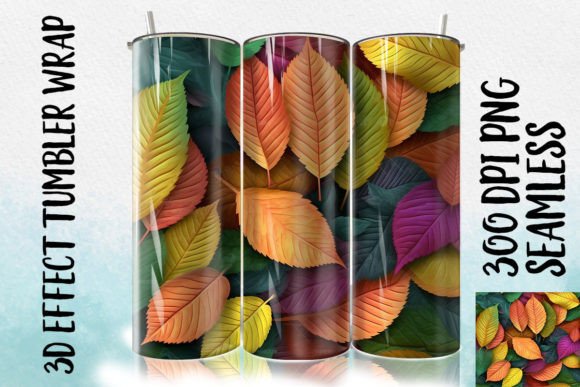
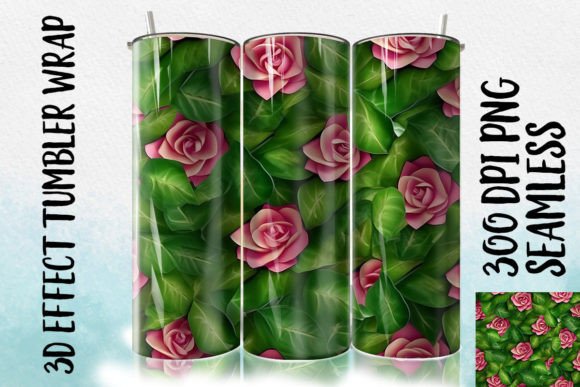
The "3D" aspect of the design refers to the visual depth and texture rendered in the artwork, giving the camellia leaves a lifelike appearance once transferred. This level of detail requires a file format that supports transparency and high color fidelity, which is why the PNG format is utilized. Unlike JPEGs, PNGs maintain crisp edges and allow you to layer the leaf design over different background colors or patterns without a white box surrounding the image. This flexibility is vital for creators who need to adapt a single design asset across various product bases, such as white tumblers, colored stainless steel, or even ceramic mugs.
Pre-Production: Preparation and File Management
Integrating the 3D Camellia Leaf Tumbler Wrap into your workflow begins before you ever open your design software. Efficient file management is the backbone of a professional operation. Upon receiving the ZIP file, your first step should be extraction and organization. Do not leave files in your "Downloads" folder. Create a dedicated directory structure, perhaps organized by season, product type, or client. For instance, you might have a folder named "Spring Collection 2024" containing subfolders for "Raw Assets" and "Final Designs."
Once extracted, verify the integrity of the 37 PNG files. Open a few samples in your image viewer to ensure they render correctly and that the transparency is intact. This quality control step prevents headaches later in the process. If you are using design software like Adobe Photoshop, Illustrator, Canva, or CorelDRAW, import the files now to check their scalability. Although these files are sized at 9.06 x 8.11 inches, understanding how they behave when resized or manipulated is part of the planning phase. Remember, while you can scale down a 300 DPI image with minimal loss, scaling up beyond its intended resolution can result in pixelation, compromising the final product's professionalism.
Design Integration and Customization
The true power of the 3D Camellia Leaf Tumbler Wrap lies in its versatility during the design phase. Because these are digital files, they serve as building blocks rather than finished products. You might use the camellia leaves as the primary focal point, centering them on the tumbler wrap template. Alternatively, they can function as accent elements, framing a monogram, a business logo, or a motivational quote.
Consider the workflow of a custom order. A client requests a set of tumblers for a bridal party with a botanical theme. Instead of drawing leaves from scratch—a time-consuming process that requires artistic skill and consistency—you can deploy the 3D Camellia Leaf assets. Import the PNGs into your canvas, arrange them to create a seamless border, and overlay the clients' names using a complementary typography font. This approach drastically reduces turnaround time. What might have taken an hour of illustration now takes ten minutes of arrangement.
Furthermore, these assets interact seamlessly with other design resources. You can combine the camellia leaves with watercolor backgrounds, geometric patterns, or glitter overlays available in your library. The high resolution ensures that when these layers are merged, the final composite remains sharp. For marketers and bloggers creating content around DIY projects, these files offer a consistent aesthetic that helps build brand recognition. By using the same high-quality leaf motif across social media graphics and physical products, you create a cohesive visual identity.
The Sublimation Process: From Screen to Physical Product
Once the design is finalized, the workflow moves to the physical implementation stage. It is important to reiterate that the 3D Camellia Leaf Tumbler Wrap is a digital file only; it does not include physical tumblers or sublimation paper. You must bridge the gap between the digital asset and the physical world through proper printing techniques.
Start by mirroring your design. Sublimation printing requires the image to be flipped horizontally so that it reads correctly once transferred onto the curved surface of the tumbler. Use your printer's settings to ensure "High Quality" or "Photo" mode is selected to utilize the full 300 DPI potential of the PNG files. Sublimation paper choice also matters; select a paper weight and coating compatible with your specific ink set to prevent bleeding or color shifting.
After printing, cut the design to the precise dimensions of your tumbler blank. The 9.06 x 8.11-inch sizing is a guideline, but always measure your specific blank, as manufacturing tolerances can vary slightly between brands. Secure the printed wrap tightly around the tumbler using heat-resistant tape. Any gaps or wrinkles here will result in ghosting or blurred lines in the final product, negating the high quality of the original 3D Camellia Leaf design. Consistency in wrapping tension is a skill that improves with practice and is critical for maintaining professional standards.
Optimizing for Efficiency and Scale
For entrepreneurs and small business owners, the goal is often scalability. How do you move from making one tumbler to fifty? The answer lies in batch processing. Since the 3D Camellia Leaf Tumbler Wrap files are ready-to-use, you can create multiple variations in your design software simultaneously. Set up artboards for different color combinations or text personalizations, then print them in a single run. This minimizes machine warm-up times and maximizes ink efficiency.
Organization extends to your inventory as well. Knowing that you have a reliable library of digital wraps allows you to forecast production capabilities. If you know the camellia design is popular for spring, you can pre-cut sublimation paper or pre-press blanks during slower periods, readying them for the rush. This proactive planning smooths out workflow bottlenecks.
Additionally, consider the longevity of these assets. Unlike physical inventory that can degrade or go out of style quickly, digital files like the 37 PNGs in this pack remain usable indefinitely. You can revisit the 3D Camellia Leaf Tumbler Wrap next year, perhaps altering the color balance or pairing it with new trends, effectively getting multiple seasons of use from a single purchase. This long-term utility improves your return on investment and reduces the constant need to source new designs.
Troubleshooting and Quality Assurance
Even with the best assets, issues can arise. If the final sublimated image appears dull, check your printer profile and ensure you are using the correct ICC profile for your ink and paper combination. The richness of the 3D effect in the camellia leaves depends heavily on accurate color reproduction. If the edges look fuzzy, verify that your design software did not inadvertently resize the PNG to a lower resolution upon export.
Another common pitfall is ignoring the "digital only" nature of the product. Ensure you have the necessary hardware—printer, heat press, and blanks—before purchasing. The instant download feature means you have immediate access, but it also places the responsibility of execution squarely on your shoulders. Having a checklist for your equipment and materials ensures that the transition from download to finished product is seamless.
In conclusion, the 3D Camellia Leaf Tumbler Wrap is a powerful tool for anyone involved in the custom merchandise space. By treating these digital files as integral parts of a larger, well-oiled workflow, you can enhance your productivity, maintain high quality standards, and deliver exceptional results to your customers. Whether you are a solo creator or part of a larger team, the principles of preparation, integration, and consistent execution will help you leverage these assets to their fullest potential.