Unlocking Depth: The Ultimate Guide to Butterfly Shadow Box SVG Designs for Modern Crafting
In the ever-evolving world of digital crafting, few trends have captured the imagination of hobbyists and professional makers quite like the 3D butterfly shadow box. What begins as a flat digital file transforms into a stunning, multi-layered piece of wall art that plays with light and depth. At the heart of this creative revolution is the butterfly shadow box SVG, a versatile vector model designed specifically for layered paper cutting, CNC routing, and laser engraving. Whether you are a beginner picking up your first Cricut or an experienced operator managing a commercial laser cutter, understanding how these files work can open up a new dimension in your creative projects.
What Exactly is a Layered Shadow Box Design?
To the uninitiated, a shadow box might seem like a simple frame with objects inside. However, in the realm of digital fabrication, a layered design refers to a specific type of vector artwork where a single image is deconstructed into multiple distinct layers. When these layers are cut from materials like cardstock, wood, or acrylic and stacked with spacers in between, they create a three-dimensional effect.
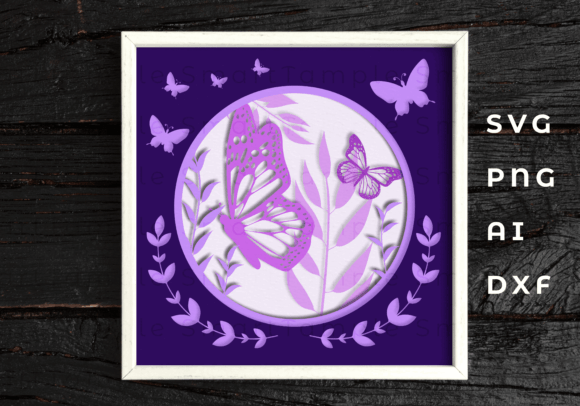
The butterfly is perhaps the most popular subject for this technique due to its intricate wing patterns and natural symmetry. A high-quality butterfly shadow box SVG will typically include anywhere from five to ten separate layers. The bottom layer serves as the background, while subsequent layers build up the body, the inner wings, the outer wings, and finally, delicate details like antennae or floral accents. This method allows crafters to achieve a level of depth and realism that is impossible with a single flat cut.
The Technology Behind the Art
The magic of these designs lies in their compatibility with modern cutting technology. These files are not just images; they are mathematical paths that tell a machine exactly where to cut. The primary file format you will encounter is the SVG (Scalable Vector Graphics). Unlike pixel-based images (like JPEGs) which become blurry when enlarged, SVGs remain crisp at any size. This makes them ideal for projects ranging from small greeting cards to large-scale home decor.
However, versatility is key in the maker community. A comprehensive digital product package usually includes a variety of formats to ensure compatibility with every machine on the market:
- SVG: The gold standard for web-based cutters like Cricut Design Space and Silhouette Studio.
- DXF: Often preferred by users of older Silhouette machines or those who need precise control over node editing.
- AI: Adobe Illustrator files for professional graphic designers who wish to modify the vector paths before cutting.
- PNG: High-resolution raster images useful for sublimation printing or digital previews.
If you find yourself in a unique situation where your specific workflow requires a different file type, many creators offer flexibility. It is always worth noting that you can contact the designer if you need another type of file to ensure your project proceeds without technical hurdles.
Materials Matter: From Paper to Plywood
One of the most exciting aspects of using a 3D butterfly vector model is the sheer range of materials you can utilize. The design is agnostic to the medium, meaning the same file can produce vastly different aesthetic results depending on what you feed into your machine.
For those new to the craft, paper and cardboard are the most accessible starting points. Cardstock in varying weights (typically 65lb to 80lb) holds its shape well and comes in endless color combinations. By using contrasting colors for each layer, you can make the butterfly appear to pop off the wall. For a more ethereal look, translucent vellum or acetate sheets can be sandwiched between paper layers to catch the light.
As you advance, you might explore more durable substrates. Wood, MDF, and plywood are excellent choices for laser cutters and CNC routers. A shadow box cut from thin birch plywood offers a rustic, organic feel that fits perfectly in farmhouse or bohemian interiors. When working with wood, the layers are often stained or painted individually before assembly to highlight the grain and depth.
For the truly ambitious, plastic and metal sheets can be used. Acrylic shadows boxes create a modern, glossy finish, while thin aluminum sheets can be engraved and cut for industrial-chic decor. The only limitation is the capability of your machine and the thickness of the material it can handle.
Common Misunderstandings About Layered Files
Despite their popularity, there are a few common misconceptions about shadow box files that often trip up beginners. Clarifying these can save you time, money, and frustration.
- "One file equals one cut." This is the most frequent error. A shadow box SVG is a composite of many layers. You must ungroup the file in your software and send each layer to the mat individually. If you try to cut them all at once without separating them, you will end up with a jumbled mess.
- "Any spacer will work." The depth of your shadow box depends on the spacers used between layers. Foam tape is common for paper, but for wood or heavy materials, you may need to design custom spacer rings or use wooden dowels. Failing to account for spacer thickness can result in a frame that is too shallow to close properly.
- "It works on any machine automatically." While SVG is universal, settings are not. Cutting velvet paper requires different pressure and speed than cutting basswood. Always perform a test cut on a small scrap of your chosen material before committing to the full design.
The Practical Relevance in Modern Creativity
Why has the butterfly shadow box become such a staple in modern crafting? The answer lies in the intersection of accessibility and professionalism. In the past, creating 3D relief art required advanced sculpting skills or expensive molding equipment. Today, with a digital product downloaded instantly, anyone can produce gallery-quality art from their home.
This democratization of design has significant implications for small businesses and educators. For entrepreneurs, these files offer a low-overhead way to create inventory for Etsy shops, craft fairs, and boutique stores. Because the files are digital, there is no physical storage cost until a sale is made. Upon payment, the customer receives a ZIP-archive containing all necessary files, allowing for immediate production.
In educational settings, these projects teach valuable STEAM (Science, Technology, Engineering, Arts, and Mathematics) concepts. Students learn about vector geometry, spatial reasoning, and material properties while engaging in a tactile, rewarding artistic process. The butterfly motif, symbolizing transformation and growth, adds a layer of thematic resonance that makes these projects popular for nurseries, classrooms, and therapy centers.
Building a Broader Understanding of Digital Fabrication
Engaging with layered designs is more than just following instructions; it is an entry point into the broader world of digital fabrication. It teaches the user to think in layers, to visualize the final product before a single cut is made, and to understand the relationship between digital data and physical matter.
Furthermore, it highlights the importance of file management and organization. When working with complex multi-layer projects, keeping track of which layer corresponds to which color or material is crucial. This organizational skill translates directly to other areas of life and work, fostering a mindset of precision and planning.
Whether you are decorating your own home, launching a side hustle, or teaching a workshop, the butterfly shadow box SVG represents the perfect blend of art and technology. It proves that with the right tools and a bit of creativity, we can bring flat ideas to life in the most beautiful ways imaginable.
As you embark on your next project, remember that the journey from a simple vector line to a towering 3D masterpiece is within your reach. All it takes is the right file, the appropriate material, and the willingness to experiment. Happy crafting!